8 restaurant KPIs every owner should track daily
Orders, revenue, average order value, prep time, tables active, best sellers and more: the restaurant KPIs that matter and what to do when they move.
Most restaurant owners know how a night went by feel: busy, quiet, smooth, chaotic. Numbers turn that feeling into something you can act on. You don't need a finance degree or a complicated spreadsheet; a handful of restaurant KPIs, checked every day, tells you most of what you need to know.
Here are eight restaurant metrics worth tracking daily, what each one tells you and what to do when it moves.
Why daily numbers matter
Monthly reports tell you what already happened. Daily numbers let you react while it still matters: add a cook for Friday, fix a slow dish this week, or notice that a new menu item isn't selling. The key is comparing like with like: today against the same day last week, not Tuesday against Saturday.

1. Orders today
What it is: the number of orders placed today.
Why it matters: it is the simplest measure of how busy you are. Compared with the same day last week, it shows whether you are growing, steady or slipping.
What to do: if orders drop on certain days, look at what changed: weather, a nearby event, a price change or a dish that ran out early.
2. Revenue today
What it is: the total value of today's orders.
Why it matters: orders tell you how busy you were; revenue tells you how much those orders were worth. The two don't always move together.
What to do: if orders are steady but revenue falls, guests may be ordering smaller meals or cheaper dishes. Look at your menu layout and pairings (see our digital menu design tips).
3. Average order value
What it is: revenue divided by the number of orders.
Why it matters: it shows how much a typical order is worth. Small changes add up across hundreds of orders.
What to do: make sides, breads and drinks easy to add; offer sizes where they make sense; place natural pairings next to mains.
4. Average prep time
What it is: the average time from when an order is placed to when the kitchen marks it ready.
Why it matters: slow food is one of the most common guest complaints, and it limits how many tables you can serve in an evening.
What to do: check which hours are slowest and which dishes hold the kitchen up. A kitchen display system with timers makes slow orders visible before guests complain.
5. Tables active
What it is: how many of your tables have an open order right now, out of the total.
Why it matters: during service it shows how full you really are. Over time it shows which hours have spare capacity you could fill.
What to do: if tables are often empty at certain hours, try a time-limited offer or a set menu for that slot.
6. Orders by day of the week
What it is: order counts for each day of the last week.
Why it matters: it shows your weekly rhythm, so you can plan staff and stock for busy days and avoid over-preparing for quiet ones.
What to do: match staff rotas and prep lists to the pattern, and check it again after holidays or season changes.
7. Best sellers
What it is: the dishes that bring in the most revenue (or sell the most) this week.
Why it matters: best sellers are the heart of your menu. They should be easy to find, always in stock and consistent every time.
What to do: put them in a Popular section at the top of the menu, protect their stock and train every cook on them. Look at the slow sellers too: improve their photo and description, or remove them.
8. Cancelled orders and remakes
What it is: how many orders were cancelled or had to be cooked again.
Why it matters: every cancellation or remake is wasted food and time, and often an unhappy guest.
What to do: note the reason each time. Patterns point to fixes: a confusing dish name, a missing option or a sold-out dish that wasn't switched off. See how to reduce order mistakes.
How to build a daily habit
- Check the same numbers at the same time, for example after lunch service and at closing.
- Compare with the same day last week, not the day before.
- Write one action when a number moves: "add a cook on Friday from 8 pm", "photograph the new kebab".
- Review the week every Monday: orders by day, best sellers and prep time.
Getting the numbers without extra work
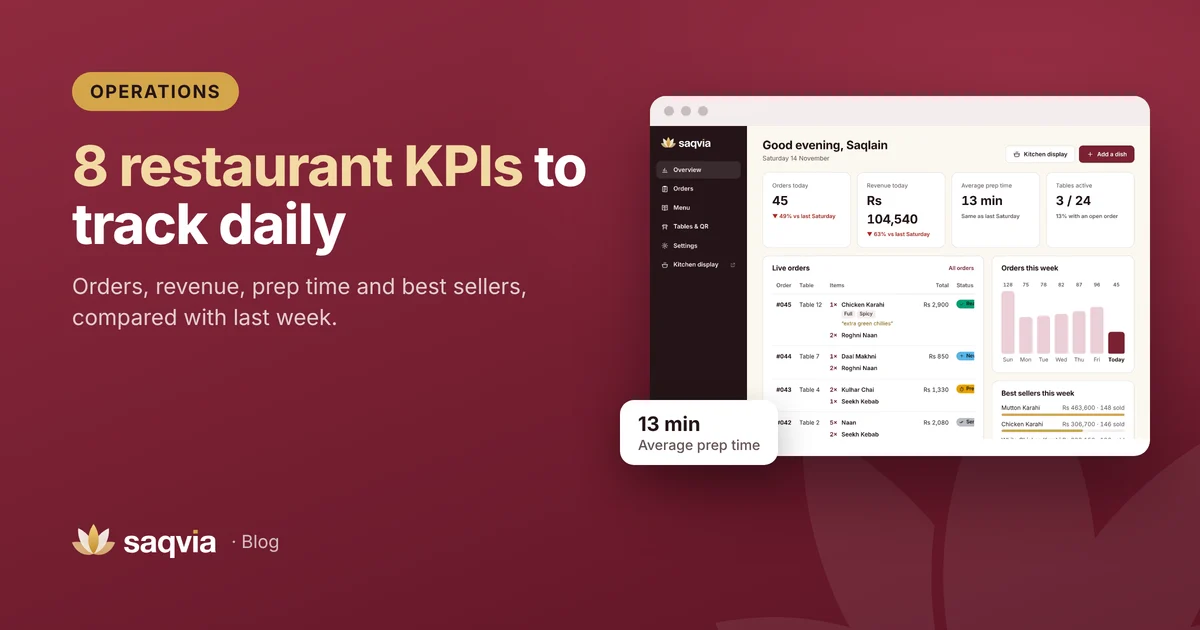
With paper orders, these numbers mean hours of counting. When orders go through a digital ordering system, they are recorded automatically. In Saqvia the owner dashboard shows orders today, revenue, average prep time and tables active, each compared with the same day last week, plus live orders, orders this week and best sellers. It works on a phone, so you can check it from anywhere.
See it in action in the Saqvia demo tutorial (step 2 shows the dashboard), or book a free demo to see your own venue's numbers.
Frequently asked questions
What are the most important restaurant KPIs?
Orders, revenue, average order value, average prep time, tables in use, orders by day, best sellers and cancelled or remade orders.
How often should I check restaurant KPIs?
Check a few key numbers daily, compared with the same day last week, and review the full week every Monday.
How is average prep time measured?
In Saqvia it is the average time from when an order is placed to when the kitchen marks it ready.